
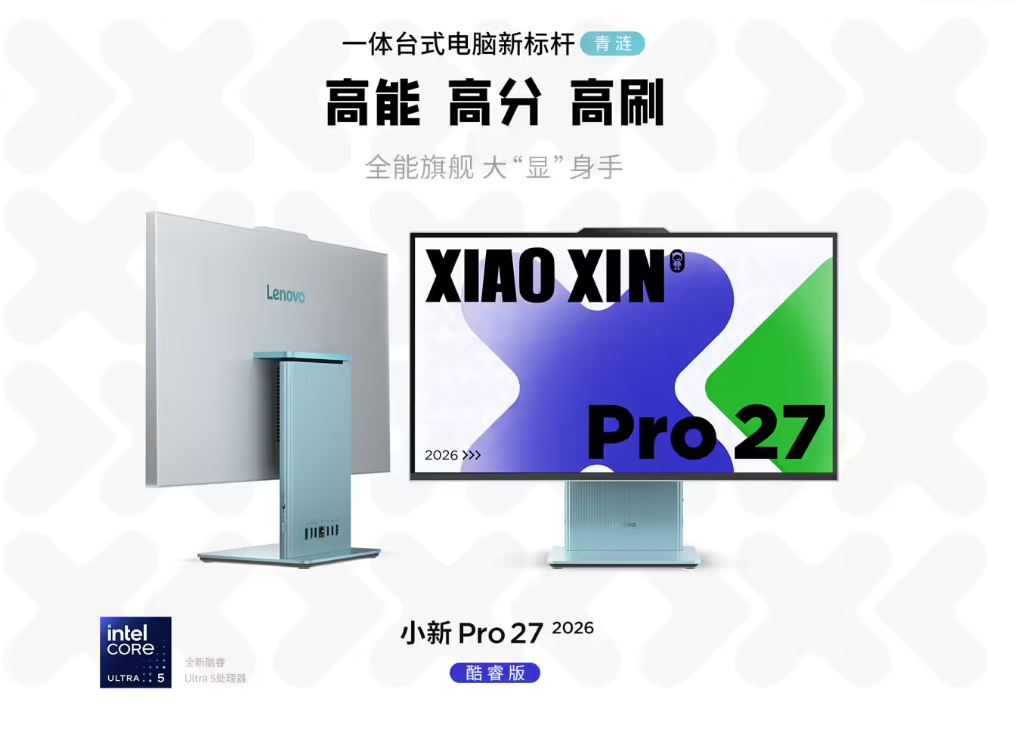
Exploring the Lenovo Xiaoxin Pro 27 2026: A Leap Forward in Desktop Computing
Lenovo has unveiled its latest all-in-one desktop, the Xiaoxin Pro 27 2026 Core Edition, in China. This new device is aimed at users seeking a blend of sleek aesthetics and robust hardware performance. With its ultra-thin design, vibrant display, and Intel’s cutting-edge Core Ultra processor, it promises to redefine what you can expect from a desktop computer.
Design Innovations: Ultra-Slim and Eye-Friendly
The standout feature of the Xiaoxin Pro 27 is its remarkably slim profile—just 15.8mm thick. This design not only saves desk space but also delivers a minimalist look that fits seamlessly into modern workspaces. Lenovo has incorporated eye comfort technology, which helps reduce strain during prolonged use. For students and tech enthusiasts who spend hours in front of their screens, this is a welcome upgrade.
Display Technology: 120Hz QHD for Smooth Visuals
Sporting a QHD (2560 x 1440) display with a 120Hz refresh rate, the Xiaoxin Pro 27 offers crisp visuals and fluid motion. Whether you're editing photos, watching videos, or gaming, this display ensures every detail stands out. For those learning about display technology, this is a great example of how higher refresh rates and resolution can enhance user experience.
Hardware Power: Intel Core Ultra Chip
At the heart of the Xiaoxin Pro 27 is the Intel Core Ultra processor. This chip is designed to deliver high performance for multitasking, content creation, and demanding applications. Tech learners will appreciate how newer CPU architectures like this one boost speed and efficiency, making the desktop suitable for everything from coding to video editing.
What This Means for Tech Beginners
If you’re just starting out in tech, the Xiaoxin Pro 27 showcases the latest trends in desktop computing: compact design, eye-friendly screens, and powerful processors. Understanding these advancements can help you make informed decisions when choosing your own hardware or planning upgrades. The focus on user comfort and performance highlights how manufacturers are responding to the needs of modern learners and professionals.
How to Learn About All-in-One Desktop Technology
- Research Key Components: Dive into articles and videos explaining processors, display technology, and ergonomic features. This will build your foundation in desktop hardware.
- Compare Models: Look at competing all-in-one desktops to analyze differences in specs, design, and pricing. This comparison sharpens your critical thinking and helps you spot real value.
- Hands-On Experience: If possible, visit local stores or tech expos to try out devices like the Xiaoxin Pro 27. Experiencing hardware firsthand is invaluable for understanding its advantages and limitations.
Unique Angle: Why Modern All-in-One Desktops Matter for Learning
All-in-one desktops like the Xiaoxin Pro 27 are more than just office tools—they’re learning platforms. Their streamlined design and powerful internals make them ideal for online courses, creative projects, and collaborative work. As tech education moves increasingly online, devices that combine comfort, performance, and versatility are essential for productive study and experimentation.
Three Practical Takeaways
- Prioritize Eye Comfort: If you spend long hours on your computer, look for screens with eye protection features to reduce fatigue.
- Understand Hardware Specs: Learning about processors and display technology helps you choose a device that matches your needs and goals.
- Embrace Compact Designs: Modern desktops are getting slimmer and more efficient—perfect for maximizing workspace and minimizing clutter.